No products in the cart.
Make Big Money As Our Influencer. See How
Become One Of Our Distributors. Know More
Be the first to know about our Sales. Join our group


HOW TO DROP A REVIEW ON WWW.MERCYLINKSTORE.COM
- Check your email for a message from Mercylink Store titled “We’ve created an account for you on Mercylink Store – See login details’. Open it to find your username. Password and login link.
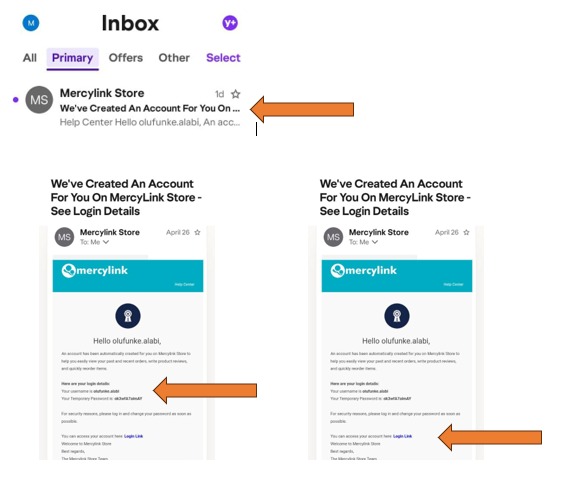
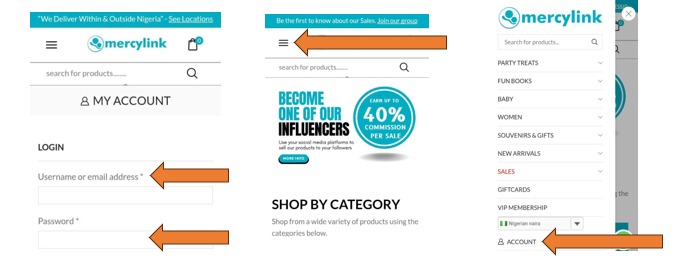
2. When you click the login link, it takes you to the ‘My Account’ page on the Mercylink Store website, where you enter the username and password you received in your email (as shown above).
(Notes: You don’t have to go to your email every time you want to log in to review products. On your phone, tap on the 3 lines to the left on our homepage. Then scroll down to ‘My Account’ tab click on it and enter your log in details.
Note B: To log into ‘My Account’ from your desktop, click on sign in/ register on the top-right part of the homepage and then you fill in your log in details.)
3. Once your log in successful, it takes you to this next page. Here, you click on ‘Orders’, on the left side of the page and then it brings you to the ’write a review’
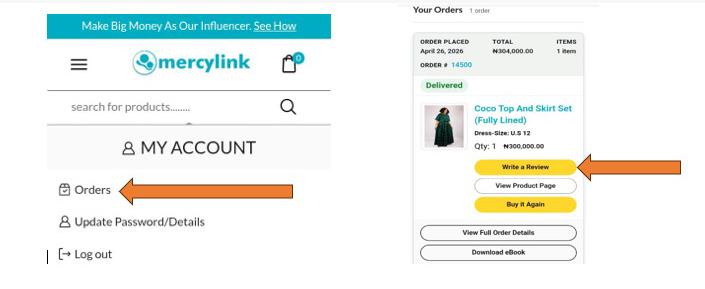
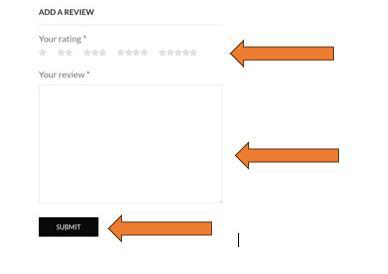
4. Click on the ‘write a review’ tab and then it takes you to the review section where you can drop a review and give star ratings on the shown product or products and hit the submit button. That’s it.
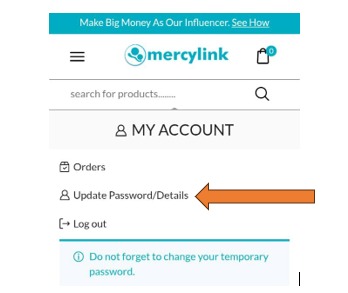
5. On the ‘My Account’ page, you can change your password to a new one by clicking on the ‘update password/details’ tab as shown below.